

.png?width=1252&height=362&name=QUID_Logo_WHITE%20(2).png)
Product release | Announced July 22, 2026
Every answer an AI gives you is downstream of a decision most people never see: which data it looked at.
In consumer and market intelligence, that decision does most of the work. A question about how a product launch landed will return something very different depending on whether it runs against six months of global conversation or three weeks of one market's reviews. Same question, same system, different answer. Which means the quality of your research depends less on how well you phrase the question than on whether you pointed it at the right body of data.
The Dataset Library is where that decision now happens inside Quid Terminal. It gives every dataset a visible identity, so choosing the right one is a deliberate step rather than a guess.
Quid is a consumer and market intelligence platform. We compliantly ingest more than two petabytes of data through direct partnerships with social, news, broadcast, search, patent, and investment sources, including Meta, Reddit, TikTok, and YouTube. That means over 200 million social posts a day, news from more than 580,000 sources, broadcast transcripts from 1,500 channels, 85 review sites, and 10,000 forums, alongside your own data: customer feedback, NPS, support tickets, CRM records, search volume. Twenty years of proprietary natural language processing turns that into something you can analyze.
Raw scale is not the point though. Nobody wants two petabytes. What you want is the slice of it that answers your question, which is where AI datasets come in.
An AI dataset is a defined body of that text, organized around a specific business question: your brand, your product, your audience, your category, your competitive landscape. Not "all social media," but a bounded collection with specific sources, markets, and time frames. Every piece of analysis in Quid runs against one.
Quid Terminal is where you work with them:
Teams accumulate datasets. Someone builds one for a campaign, someone else spins one up for a competitor review, a third person sets one up for an annual category study, and Quid's Outcome Engineers publish Certified Datasets covering seasonal moments and major events. Six months later there are dozens of them, named by whoever created them, and the person who needs to answer a question today has no fast way to tell which is which.
Two datasets can have nearly identical names and cover completely different things. One might include news and broadcast while the other is social only. One might span two years, the other two months. One might be scoped to a single market. From a list of names, they look the same.
The usual workaround is tribal knowledge. You ask the colleague who built it. That works until they are on leave, or they leave, or there are simply too many datasets for anyone to hold in their head. And the cost of guessing wrong is not an error message. It is a perfectly confident answer drawn from the wrong data, which is much harder to catch.
The Dataset Library replaces that with something legible on sight.
A readable identity for every dataset. Each one shows four things at a glance:
Together these let you see the shape of a dataset before you commit a question to it.
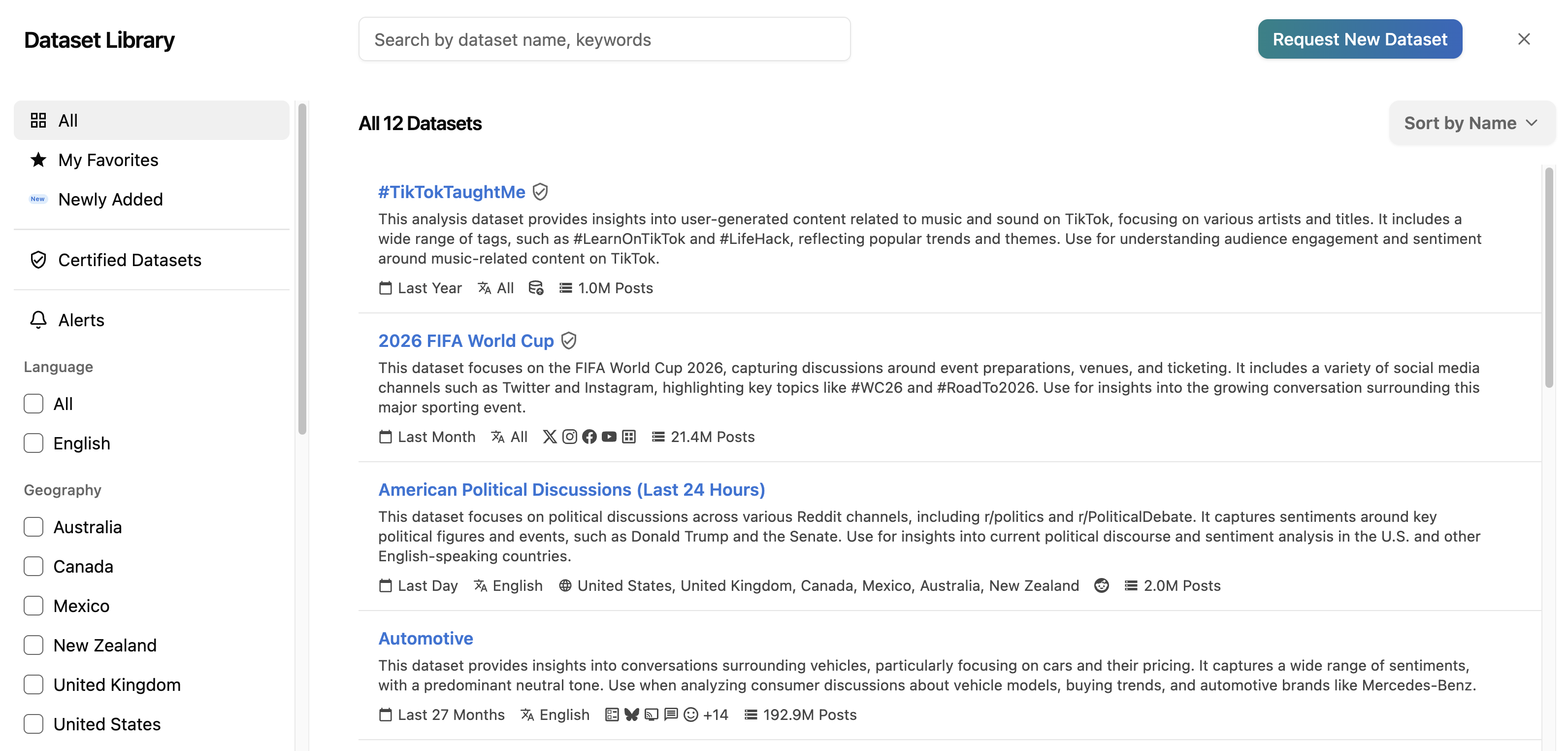
Example of a Quid Dataset Library
Descriptions that write themselves. Once a topic or analysis is added and saved, a description is generated automatically and appears in about thirty seconds. You can then edit it by hand, along with the example questions shown for that dataset.
This matters more than it sounds. Documentation is the first thing that gets skipped when a team is moving fast, and a library full of undescribed datasets is just a list of names again. Generating the first draft means the description exists by default, and human effort goes into refining it rather than creating it from nothing. The realistic alternative was never "better descriptions." It was no descriptions.
Sorting and filtering built for how people actually work. A "Recently Used" view surfaces what you were last working in, which is usually what you want next. Favorites keep the handful of datasets you use weekly at the top instead of scrolling past everything else. Source filtering narrows a long list to just the datasets drawing on the channels you care about, so if you only need review data, you only see review-based datasets.
Source and volume detail pulled through automatically. The sources behind a dataset are inherited from the underlying topic rather than entered by hand, so the labeling reflects what the dataset actually contains rather than what someone typed when they set it up months ago.
Admin control over how datasets get used. Admins can edit dataset descriptions, and those descriptions carry through into Ask Q. That is the part worth pausing on.
A dataset description in Quid is not a label. It is an input.
When someone asks a question in Ask Q, the description informs how that dataset is interpreted and applied. A vague description produces a vague match between question and data. A precise one, written by the person who knows what the dataset is for and what it is not appropriate for, produces answers that reflect how the team actually uses it.
So the library does two jobs at once. It helps a person choose the right dataset, and it helps Ask Q reason about that dataset once chosen. Which means improving the organization of your library directly improves the quality of the answers coming out of it. Documentation and answer quality are the same project here, which is not usually how those two things get described.
The stakes scale with automation. A person asking a one-off question can sanity check the answer themselves. A Q Agent running on a schedule and delivering briefs to a team every week is working from that dataset selection repeatedly, without anyone re-examining it each time. The better labeled your library, the more of that automated output you can trust without auditing it.
It also means the institutional knowledge that used to live in one analyst's head now lives in the system, where it shapes every answer rather than just the ones that analyst is around for.
If you already use Terminal, this is where your datasets become browsable and self-explanatory, and where your admins can encode what each one is for so the whole team benefits from it.
If you are new to Quid, the more useful takeaway is about how AI-driven research tools should work. Most of them ask you to trust the answer. The more valuable design gives you visibility into the data underneath it: which sources, how much of it, what time frame, described in terms you can check and correct. The Dataset Library is that layer made explicit, and it exists because analysts asking real questions of real data need to know what they are querying before they act on the result.
The library is the foundation for a larger shift toward customers building and managing their own data rather than requesting it.
Work in progress includes per-dataset example questions that admins can customize, so the suggested prompts on each dataset reflect the questions that team actually asks. Dataset alerts are moving into the library as well, meaning the notifications that tell you when something shifts in a dataset (a spike in volume, a change in sentiment) will be set up and managed alongside the dataset itself rather than through a separate tool. Datasets will also be able to link back to Quid Monitor for users who have access there. And access is being expanded so external collaborators, not just internal admins, can create and manage datasets.
Longer term, the library supports customers building their own datasets and publishing them from Monitor into Terminal.
The direction is consistent: more of the data layer in the hands of the people asking the questions.
Dataset Library is live in Quid Terminal now. Request a free trial to see how it fits into your research workflow.