

.png?width=1252&height=362&name=QUID_Logo_WHITE%20(2).png)
.png?width=1380&name=PRODUCT%20RELEASES%20(10).png "<span id=\"hs_cos_wrapper_name\" class=\"hs_cos_wrapper hs_cos_wrapper_meta_field hs_cos_wrapper_type_text\" style=\"\" data-hs-cos-general-type=\"meta_field\" data-hs-cos-type=\"text\" >Product Release: Q Alerts</span>")
Key takeaways:
Nobody can watch every dataset every day, which means the question is rarely whether something happened and almost always whether anyone noticed in time. Q Alerts close that gap by watching a dataset on a schedule and telling you when something crosses the line you drew, with the analysis of what changed already written.
There are two kinds, because there are two kinds of question. Sometimes you want to know when the conversation as a whole moves, and sometimes you want to know the moment one particular post appears.
A metric alert watches a dataset for movement and fires when the number you chose crosses the threshold you set.
Each run compares two windows of equal length, the most recent period against the period immediately before it, and evaluates the condition against that comparison. You can set the window anywhere from one day to 180, which determines both how quickly the alert reacts and how noisy it is, since shorter periods pick up daily fluctuation while longer ones smooth it out and respond more slowly.
Setting one up can be as light or as precise as you want. The standard version works from presets that pair a metric with a direction of movement, such as a surge in buzz, and a sensitivity control that decides how large a shift has to be before the alert fires, with higher sensitivity producing more frequent alerts and lower sensitivity reserving them for large swings. The custom version exposes the mechanics directly, letting you pick the metric from post count, mention count, positive or negative mention count, net sentiment, engagements or impressions, and then set the threshold either as an absolute number, such as ten thousand mentions, or as a percentage change against the previous period.
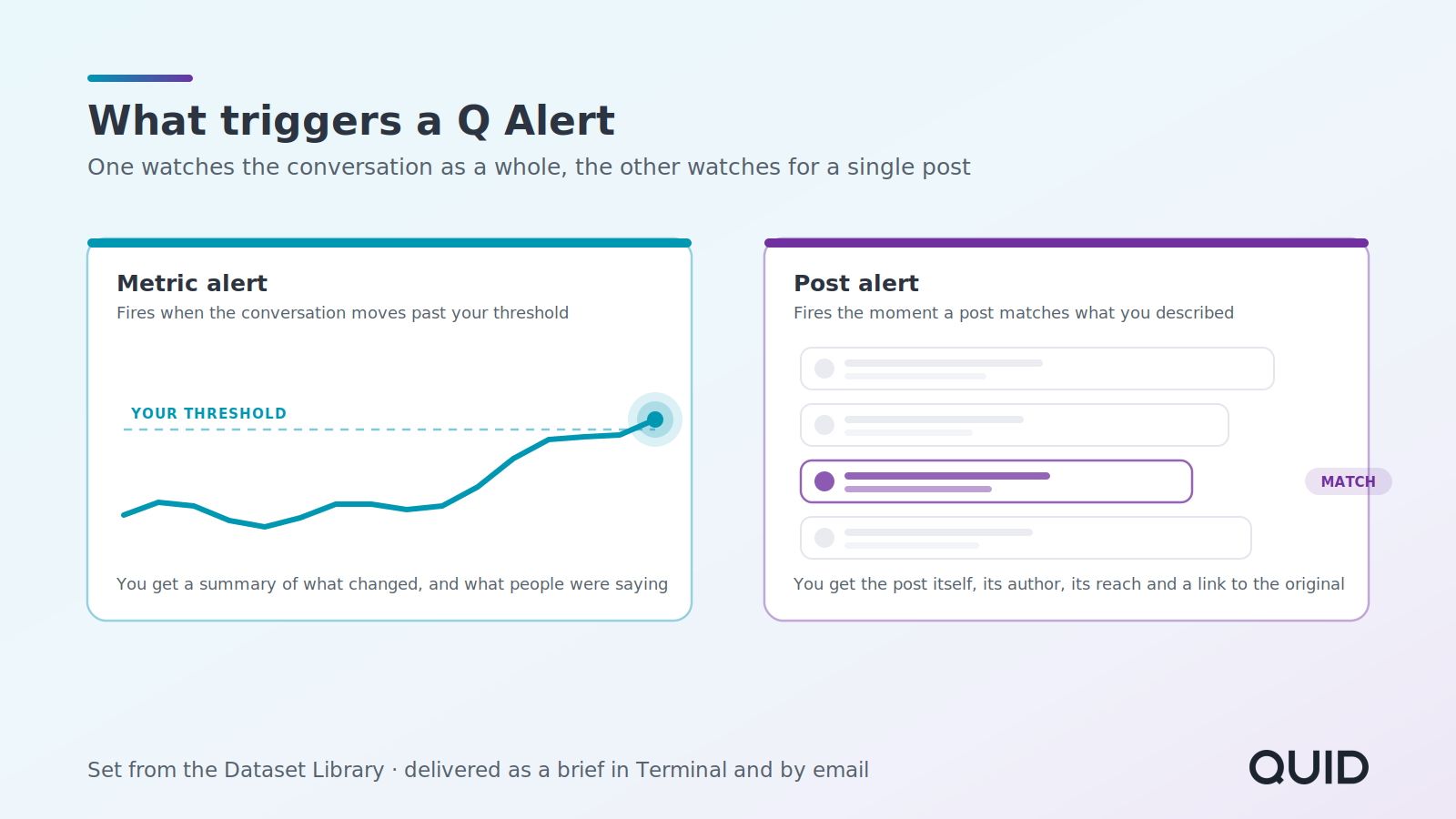
Metric alerts work best on datasets with real volume behind them, since the comparison needs enough posts to be meaningful. A hundred or more matching posts is the point where the output starts to be reliable.
A post alert watches for individual posts and fires as soon as one turns up that matches what you asked for.
Each run looks at everything published in the dataset over the past five days, discards anything it can't link back to an original, applies whichever filters you set, and removes anything a previous run already sent, so the same post never reaches you twice. What survives becomes the alert.
The most useful filter is the one that asks what a post should contain, because you answer it in plain language rather than keywords. Describing the posts you want the way you would brief an analyst means the match is made on meaning, so an alert set for posts that mention a product recall or safety issue will catch a post describing exactly that without ever using the word recall. You can narrow further by source across Facebook, Instagram, YouTube, X, TikTok, Reddit, Forums, Blogs and News, by minimum author followers when relevance depends on who is speaking, and by minimum engagement when it depends on whether a post travelled.
Those filters combine with AND, which makes it easy to narrow an alert into silence. Start with the dataset, add the content description, and only reach for the others in response to volume you actually don't want.
Both kinds produce a brief rather than a notification, which is the part that matters most.
A metric alert generates a narrative summary of the period that triggered it, with comparison tables against the previous period, and the brief carries every metric for context rather than only the one that crossed the threshold. You find out that mentions jumped, and also what people were talking about while they jumped.
A post alert produces a card for each matching post, carrying the author, the source, the publish time, a snippet, an image where one exists, follower and engagement figures, and a link to the original, alongside a short summary of what the matched posts are collectively discussing. The brief holds up to fifty posts and the accompanying email shows the twenty most recent, with a link through to the rest.
Briefs land in Terminal and arrive by email, and you can give an alert its own title so it is easy to recognize in an inbox when several are running.
Alerts live in the Dataset Library. Hover over the dataset you want watched, click the bell, and choose which kind of alert you are creating.
Everything you have scheduled sits in the Alerts section of the same library, along with every brief an alert has already delivered, and each one can be paused or deleted from there.
The gap an alert fills is a specific one. Research tells you what happened when you went looking, while an alert tells you that it is worth looking at all, and the second is what you need when you are responsible for more categories than you can personally read every morning.
What makes these worth having is that they arrive with the analysis attached. A threshold crossing on its own is a fact that still needs investigating, whereas a summary of what moved, by how much, and what people were saying while it moved is already most of the way to a decision.
Q Alerts are available in Quid Terminal now. Want to see what you would set one on? Request a free demo.
A Q Alert watches a Quid dataset on a schedule and sends a brief when a condition you set is met. There are two kinds: metric alerts, which fire when the conversation as a whole moves, and post alerts, which fire when an individual post matches what you described.
A metric alert watches aggregate movement in a dataset, such as a spike in mentions or a shift in sentiment, and suits datasets where hundreds or thousands of posts match. A post alert watches for individual posts and suits cases where only a small number should match, such as a journalist or customer publishing something relevant.
Post count, mention count, positive mention count, negative mention count, net sentiment, engagements and impressions. Whichever metric triggers the alert, the brief that follows includes all of them for context.
No. You describe what a post should contain in plain language, and the match is made on meaning rather than exact wording, so an alert for posts mentioning a product recall will catch posts that describe one without using the word recall.
Alerts produce a brief that appears in Quid Terminal and arrives by email. Scheduled alerts and every brief they have delivered sit together in the Alerts section of the Dataset Library, where they can also be paused or deleted.
